
Legal Kanban is the use of a visual board to show every open matter, the stage it has reached and who is responsible for the next step. It works because it makes workload, bottlenecks and approvals visible to the whole team. It does not change the advice you give. It changes the process around that advice. This guide shows how to design a board that suits legal work, which mistakes to avoid and where Kanban sits within the wider discipline of Legal Project Management (LPM).
Key takeaways
- A legal Kanban board is a workflow tool. It standardises the process around the advice, never the advice itself.
- Columns should mirror how your firm or department really handles a matter, including review and sign-off, not a generic “to do, doing, done”.
- Limiting work in progress is what turns a board from a list into a management system.
- A board that lets matters skip quality checks adds risk. Build approval gateways into the review column.
- Kanban is one technique within LPM, which also covers scoping, budgeting, risk and client communication.
Table of Contents
- What legal Kanban actually is
- Why legal matters need more than a generic board
- Designing your board: columns that fit legal work
- Limit work in progress
- Building the board step by step
- Common mistakes with legal Kanban
- Where Kanban fits inside Legal Project Management
- Process first, technology second
- The South African professional context
- A worked example: a mid-sized commercial team
- How in-house teams can use it
- Take the next step with accredited training
- FAQ
- Sources
What legal Kanban actually is
Kanban began as a manufacturing scheduling method. South African engineering research shows how it was used in a prioritised Kanban system for an electric motor manufacturer, where physical cards controlled what was produced next. The idea moved easily into knowledge work: each piece of work becomes a card, each stage becomes a column, and cards travel from left to right until the work is finished.
In a law practice, a card is usually a matter, or a discrete task within a matter. A card might read “Share purchase agreement, first draft” or “Opinion on lease termination”. Each card shows the responsible practitioner, the client, the due date and anything blocking progress.
The point is not decoration. When a partner can see at a glance that eleven matters are waiting for review and only two are being drafted, the conversation changes from “why is this late?” to “where is the constraint?”
Why legal matters need more than a generic board
A generic Kanban board assumes work is interchangeable. Legal work is not. Matters carry confidentiality duties, conflict checks, professional-conduct obligations and quality sign-offs that a software team does not face. Industry commentary on LPM makes the point that the aim is to standardise the process surrounding the advice, not the law itself.
That distinction answers the objection many lawyers raise: that every matter is unique and cannot be managed like a production line. The advice is unique. The steps of intake, conflict check, scoping, drafting, review, client approval and file closure are largely repeatable. The same source describes LPM as resting on the observation that legal matters share features with ordinary projects: a unique result, a finite beginning and end, and limited resources.
It also notes that firms adopt these structures to reduce reliance on individual heroics and memory, which feed inefficiency and burnout. A board moves knowledge of “who is doing what” out of one person’s head and onto a shared surface.
Designing your board: columns that fit legal work
Start with the lifecycle you already follow. The Tech4Law piece frames a matter through four stages: assess, plan, execute and close. Those stages are a sound backbone for column design. A workable starting layout looks like this:
| Column | What sits here | Who moves the card |
|---|---|---|
| Intake and conflicts | New instructions awaiting conflict check and engagement terms | Intake lead or practice manager |
| Scoped and budgeted | Matters with agreed scope, fee basis and timeline | Responsible partner |
| In progress | Active drafting, research or negotiation | Fee earner |
| Waiting on client or third party | Matters paused for information, signatures or counterparties | Fee earner |
| Ready for review | Work awaiting supervisor or partner sign-off | Reviewer |
| Client approval | Work delivered and awaiting instructions or acceptance | Responsible partner |
| Closed | Billed, file archived, lessons noted | Practice manager |
Two columns deserve particular attention.
The “waiting” column
Legal work stalls on other people: a client who has not sent documents, a counterparty who has not replied, a registry that has not responded. If waiting time sits inside “in progress”, your board overstates how busy the team is and hides the real delay. A separate column makes external dependency visible and gives you something concrete to chase.
The review column
This is where legal Kanban differs most from the generic kind. Practitioners who have implemented boards in legal settings report that the board must reflect real quality and compliance requirements. If a card can move to “client approval” without passing a required check, the board creates false comfort. The approach that works is to build the approval gateway into the “Ready for Review” column, so that a card cannot leave it until the named reviewer has signed off.
Limit work in progress
A board without limits is a prettier to-do list. The defining discipline of Kanban is to cap how many cards may sit in each active column.
Consider an associate with fourteen matters “in progress”. Each client believes theirs is moving. In practice the associate is switching between files, and everything finishes slowly. If the “in progress” column is capped at five per person, the associate must finish or hand over something before pulling in a new matter. Cycle time falls, and the cap exposes the real question: does the team have the capacity to accept more work, or should it be redistributed?
For a small firm, a sensible way to set limits is to observe for two weeks how many matters each person genuinely works on at once, then set the cap slightly below that number and review it monthly.
Building the board step by step
- Map the current process. Walk through three recent matters of different types and note each handover. Do not design the ideal workflow yet.
- Choose the unit of work. Decide whether a card is a matter or a task. Most firms use one board for matters and separate task boards for complex files.
- Define the columns and exit criteria. Write down what must be true before a card moves, for example “engagement letter signed” before it leaves intake.
- Set work-in-progress limits. Start conservatively and adjust.
- Add the required data to each card. Responsible practitioner, client, due date, budget or fee estimate, and a blocker flag.
- Hold a short daily or twice-weekly stand-up at the board. Walk from right to left, starting with what is closest to being finished.
- Review the flow monthly. Which column accumulates cards? Where do matters wait longest? Change one thing at a time.
A physical whiteboard is a perfectly good start. A South African example in the public domain shows a team leader building a mini-business board with live Kanban and a summary board of KPIs, which let her team stream their workflow, measure performance and reduce waste. The tool matters less than the habit of using it.
Common mistakes with legal Kanban
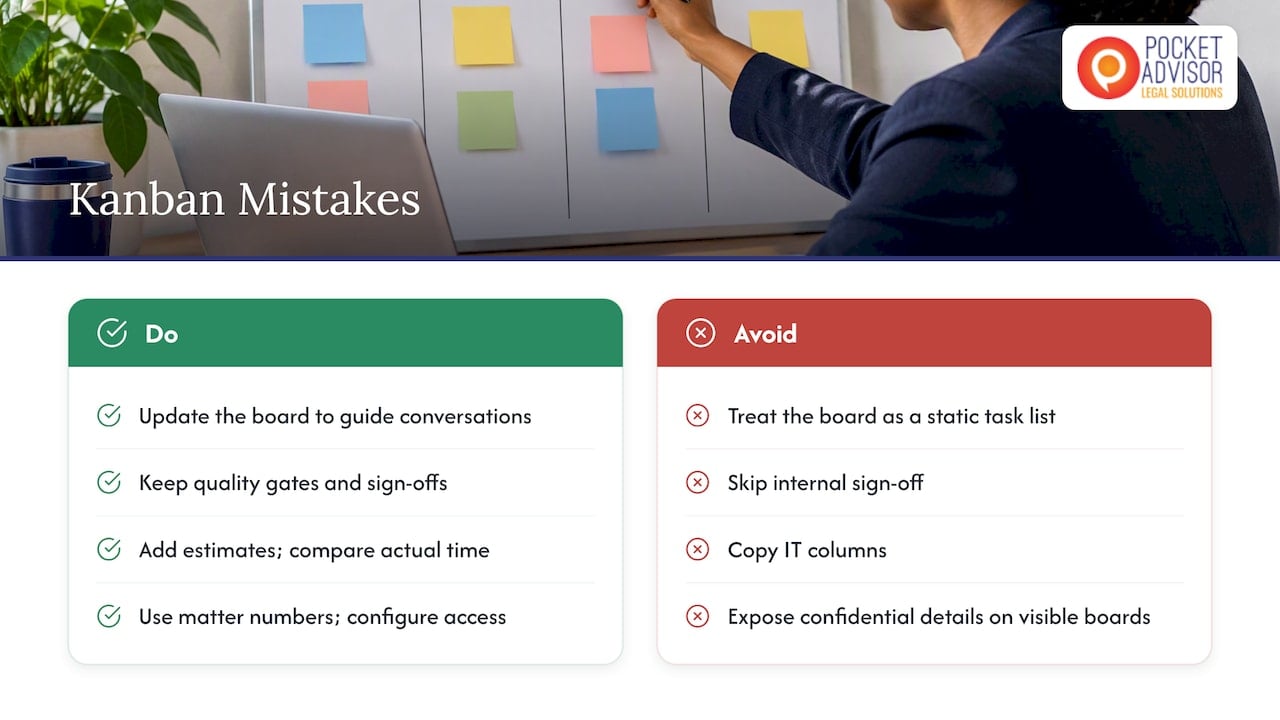
Treating the board as a static task list. If nobody updates it, or it is only filled in for the monthly meeting, it records the past rather than managing the present. The board should drive the conversation.
Skipping quality gates to look faster. Moving cards quickly feels productive, but a matter that bypasses internal sign-off has increased risk, not reduced it.
Copying an IT team’s columns. “Backlog, doing, done” misses conflict checks, fee agreements, client approval and file closure.
Ignoring the commercial side. A card with no budget or fee basis tells you what is moving but not whether it is profitable. Add the estimate to the card and compare it with actual time at closure.
Putting confidential detail on a visible board. Use matter numbers or short descriptors on any physical board that clients or visitors might see, and configure access properly on digital ones. Confidentiality duties do not stop at the whiteboard.
Expecting the board to fix a scoping problem. Kanban shows where work piles up. It does not tell you that matters were under-priced or poorly scoped at the start. That needs the wider LPM toolkit.
Where Kanban fits inside Legal Project Management
Kanban is a technique. Legal Project Management is the professional capability. LPM applies project management principles to improve legal service delivery, and it asks questions a board alone cannot answer:
- Was the matter scoped clearly, and does the client share our understanding of what is included?
- Is the budget realistic, and how will we report against it?
- Which risks could change cost or timing, and who owns them?
- How will we communicate progress so that the client is never surprised?
- What did we learn that improves the next matter?
A board visualises the answers to some of these. LPM supplies the structure, commercial awareness and continuous-improvement mindset that make the answers worth visualising. For that reason, firms that adopt Kanban without the surrounding discipline often find that the board looks tidy while profitability is unchanged.
For a broader view of the discipline, see our guide to Legal Project Management in South African practice and our explanation of legal matter management. If you lead a department or firm, our legal operations management guide covers the wider operating model.
Process first, technology second
Many firms reach for software before they have agreed a process. Digital boards are useful, particularly for remote teams and for reporting, but automating a muddled workflow only makes the muddle faster. Decide your columns, exit criteria and limits first. Then ask where automation adds genuine value: intake forms, deadline reminders, document assembly or status reports are common candidates.
The operational case for this sequence is explored in a discussion of bottlenecks in legal operations, which is relevant to anyone who wants to standardise how legal work flows without standardising the advice itself. A clear process is also what lets you judge which tool is worth buying and which is noise.
The South African professional context
South African practitioners already face a formal expectation to learn how to run a practice. Under the Legal Practice Act 28 of 2014, practitioners who practise for their own account for the first time must complete an approved practice management training course. The Law Society of South Africa’s LEAD arm offers Practice Management Training, with tuition listed at R3 380 (VAT inclusive) for 2027 intakes.
That training covers running a firm: administration, systems and technology, and financial management. Kanban sits comfortably within those themes, but it is a narrow operational tool inside them. Practice management training is not a substitute for a structured method for managing individual matters, budgets and client expectations, and that is where LPM adds something distinct. The LSSA also publishes a practice management toolkit that raises related points, such as verifying a mandate with the client and having an effective risk management plan.
A worked example: a mid-sized commercial team
Imagine a six-lawyer commercial team in Johannesburg handling about forty open matters. Partners complain that turnaround is inconsistent, and associates feel permanently behind.
The team builds a seven-column board using the layout above. In the first month they notice that “Ready for review” holds nine cards, three of them for more than a week, because two partners are in court. Work in progress is not the constraint; review capacity is.
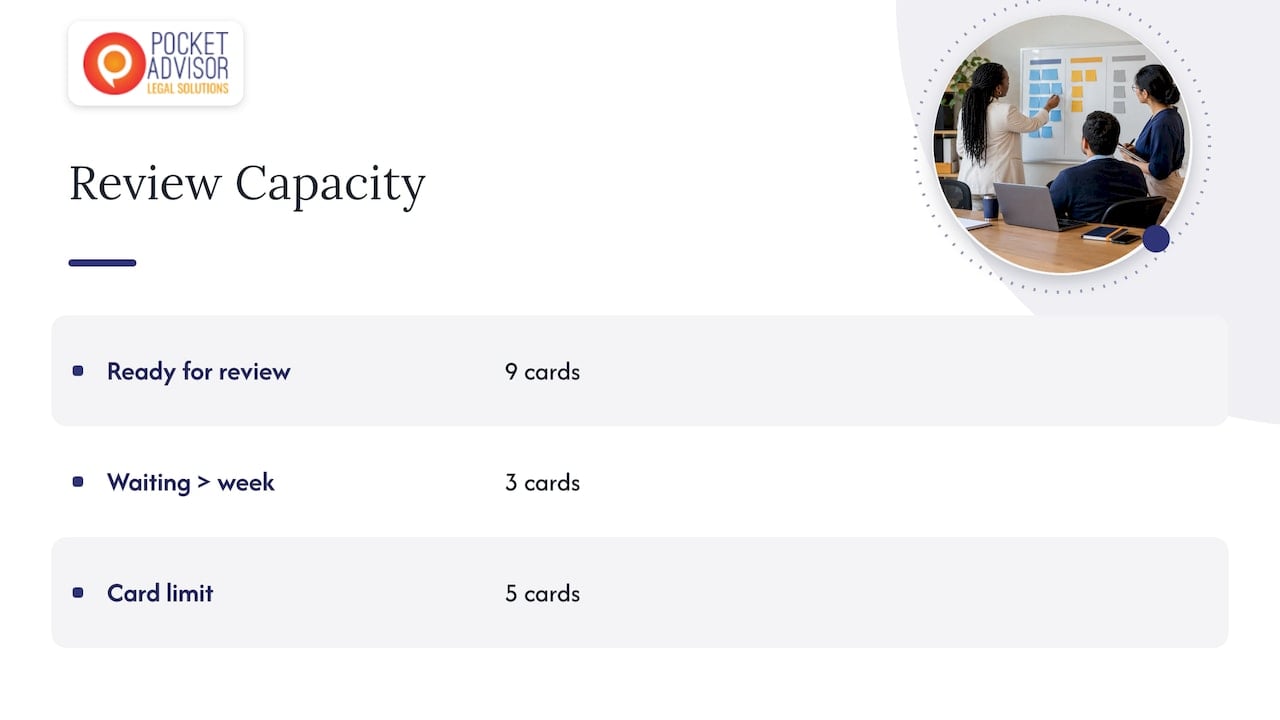
They respond in three ways. They set a limit of five cards in “Ready for review” so drafting slows when review is full. They nominate a second reviewer for routine agreements. And they add a review checklist to the column so each sign-off is recorded. Turnaround becomes more predictable, and, importantly, no matter reaches the client without the required check.
This example is illustrative rather than a reported case, but the pattern is common: the board does not solve the problem, it shows you where the problem is.
How in-house teams can use it
Corporate legal teams have a different mix of work: contract reviews for the business, advice requests, and instructions to external counsel. A board with columns for “Request received”, “Triaged”, “In progress”, “With business”, “With external counsel” and “Complete” gives stakeholders a clear view of the queue and lets the head of legal show workload objectively when asking for resources. Add a column or label for external counsel matters so budgets and instructions are tracked alongside internal work.
Take the next step with accredited training
A board improves visibility. Lasting change in a firm or legal department comes from the broader skills: scoping, budgeting, resourcing, risk and communication with the client. Our Applied Legal Project Management Course is delivered in South Africa and leads to accreditation by the International Institute of Legal Project Management (IILPM), subject to the programme’s completion requirements. It treats LPM as more than traditional project management: it brings structure, commercial awareness and a continuous-improvement mindset to legal work, and it helps firms and legal teams decide where technology and automation add genuine value. The IILPM credential can help lawyers strengthen their expertise and distinguish themselves in a competitive profession.
The Applied Legal Project Management Course is priced at R9 500 as a one-off fee, and the Premium option at R19 995 as a one-off fee. You can compare both on the course page.
Explore PocketAdvisor’s internationally accredited Legal Project Management Course: https://pocketadvisor.co.za/legal-project-management-course/

FAQ
Is Kanban free to use for a law firm?
The method itself is free: a whiteboard and sticky notes are enough to begin. Digital boards range from free tiers to paid legal practice platforms. Check how any digital tool handles client confidentiality and access control before you load matter information into it.
How is a legal Kanban board different from a normal one?
A legal board reflects conflict checks, fee agreements, review and sign-off, and client approval, none of which appear on a generic board. It also treats confidentiality as a design requirement. The aim is to standardise the process around the advice, not the advice.
What are the disadvantages of Kanban for lawyers?
A board can become a static list if nobody maintains it, and it can encourage speed over quality if review gates are not built in. It also says nothing about whether a matter was scoped or priced properly. That is why it works best as one technique within a wider LPM approach.
Do I need software to start?
No. Many teams begin with a physical board for a month to learn what columns and limits suit them. Move to software once the process is stable and you know which features, such as reminders or reporting, would genuinely add value.
Sources
- Legal Evolution/2: What is Legal Project Management and how can I leverage it? (Tech4Law)
- Team Leaders Making a Difference (KZNCTC)
- Practice Management Training 2027 (LSSALEAD)
- Practice management toolkit (LSSA)
- Design and implementation of a prioritised kanban and finite scheduling system (Wits)
Recommended
This article is for educational and informational purposes only. It is not a substitute for professional advice.