
Kanban is a visual method for managing work: every matter or task sits on a card, each card moves across columns that represent stages, and a cap on how many cards may sit in a stage at once exposes bottlenecks before they become missed deadlines. For a law firm or legal department, it is one of the quickest ways to make workload, ownership and waiting time visible. It works best when it is treated as one tool within a wider legal project management discipline, not as a substitute for scoping, budgeting and risk management.
This guide is written for practitioners, legal team leaders and in-house counsel. It explains how the method translates to legal work, how to design a board, how to use work-in-progress limits, how to measure whether the workflow is improving, and what South African confidentiality and POPIA obligations mean for the choice of board.
Key Takeaways
- Kanban makes the status, owner and age of every matter visible on one board, which supports prioritisation and client communication.
- The distinctive feature is the work-in-progress (WIP) limit: it forces the team to finish matters before starting new ones.
- A legal board should reflect the real stages of your matters, including the waiting stages that cause most delay.
- Any digital board holding client information engages POPIA security obligations and, where a vendor hosts it, a written operator contract.
- Kanban addresses flow. Scope, budget and risk still require the broader discipline of Legal Project Management.
Table of Contents
- What Kanban is, and why it suits legal work
- How a legal Kanban board is built
- Work-in-progress limits: the part that changes behaviour
- Measuring whether the workflow is improving
- Benefits and limits of Kanban in legal practice
- How Kanban fits into Legal Project Management
- Confidentiality and POPIA when the board goes digital
- Introducing Kanban in a legal team: a six-week approach
- Developing the capability in your firm or legal department
- Frequently asked questions
- Sources
What Kanban is, and why it suits legal work
The word is Japanese. The method began in manufacturing and has since been adapted for knowledge work, where its purpose is to improve communication and transparency about who is doing what. A law library at the University of North Carolina describes this adaptation of Kanban for knowledge work in the context of managing a research project, which is a useful reminder that the method is not tied to any software product.
A Kanban board has three building blocks:
- Columns, each representing a stage of work.
- Cards, each representing a unit of work, such as a matter, a document or a task.
- Limits, a ceiling on the number of cards permitted in a column at any one time.
Legal work has characteristics that make this structure attractive. Matters run in parallel, each has its own deadline and each depends on third parties: clients who must provide instructions, counterparties who must respond, registries and courts that set their own pace. Much of a practitioner’s time is spent holding a mental map of all this. A board externalises that map, so that a partner, a candidate attorney and a paralegal can all see the same picture without a meeting.
How a legal Kanban board is built
The most common error is to copy a generic software template (To Do, Doing, Done) and expect it to describe legal work. Those three columns hide exactly the information a supervising attorney needs. Design the board around how your matters actually progress.
Decide what a card represents
There are two sensible choices, and you should choose one per board:
- A card per matter. Suitable for a partner or head of legal who needs a portfolio view. Columns describe the matter’s stage.
- A card per task. Suitable for a team executing a single large matter, such as a transaction or a regulatory project, where columns describe the task’s stage.
Mixing the two on one board blurs categories and makes the board unreliable. Firms that manage matters well tend to separate tasks, diary events and documents rather than treating everything as one undifferentiated list, a point made in South African commentary on matter management. The same discipline applies to a board: one type of card, clearly defined.
Choose columns that show waiting
A practical column set for a commercial or litigation team might read:
| Column | What it means | Typical owner |
|---|---|---|
| Intake and scoping | Instructions received, conflict check and scope being confirmed | Supervising attorney |
| Ready | Scoped, budgeted and ready to be pulled into work | Team lead |
| In progress | Actively being worked on | Assigned fee earner |
| Internal review | Awaiting partner or senior review | Reviewer |
| Awaiting client | Draft or query with the client | Fee earner (chasing) |
| Awaiting third party | With counterparty, registry, court or expert | Fee earner (chasing) |
| Complete | Delivered, billed and file closed | Team lead |
The two “awaiting” columns are the most valuable part of this design. In most practices, a matter spends far longer waiting than being worked on. A board that separates waiting on the client from waiting on a third party shows where the delay originates and who is able to remove it.
Define what “complete” means
Cards that drift into the final column without a shared definition create a false sense of progress. Writing a short completion standard (who closes the matter, what must be confirmed before closure, and when an item is escalated) prevents what one South African practice-management commentator calls invisible backlogs in law firms. For a legal card, closure might require that the work product has been delivered, the final invoice issued, the file noted and any undertakings diarised.
Put the information on the card
Keep cards short but complete enough to act on. A useful minimum: matter name or reference, responsible fee earner, the next action, the next hard deadline (such as a prescription date, court date or contractual long-stop date) and the budget status. Avoid placing sensitive client narrative on the card itself; a reference number is generally enough, which also assists with confidentiality, discussed below.
Work-in-progress limits: the part that changes behaviour
A board without limits is simply a tidy list. The WIP limit is what turns it into a management system. It states, for example, that no more than four cards may sit in “In progress” per fee earner, or no more than six in “Internal review” for the team.
The reasoning is straightforward. Every additional matter a practitioner holds open increases the cost of switching between them. Commentary on delivery teams makes the same point: limiting work in progress helps maintain focus and improves throughput, because excessive concurrent work raises cognitive load and context switching. Lawyers will recognise this from experience: the afternoon spent moving between six files, completing none.
A worked example
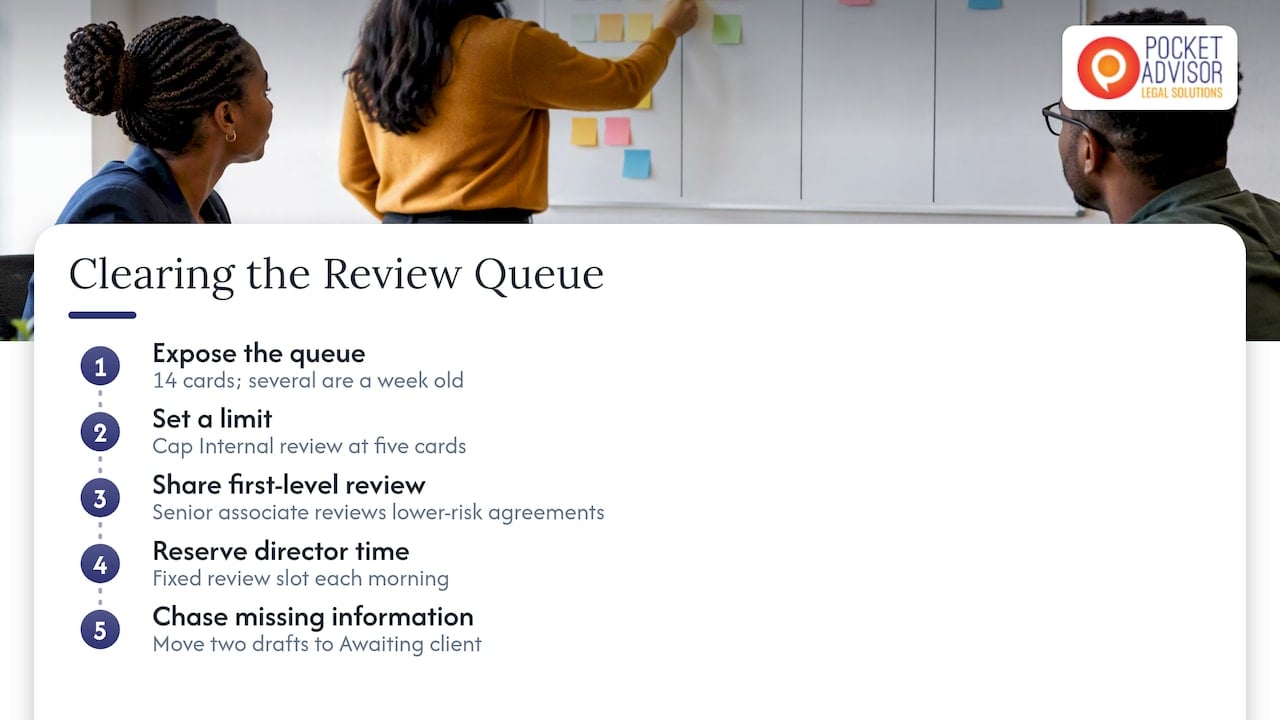
Consider a six-person commercial team at a mid-sized South African firm. Review by a single director is the stage at which work accumulates. On the board, “Internal review” holds fourteen cards, and several are a week old. The team sets a limit of five for that column.
The immediate effect is uncomfortable: fee earners can no longer push finished drafts into review without space. Instead, they must act on the board’s signal. A senior associate takes on first-level review of lower-risk agreements, the director reserves a fixed review slot each morning, and two drafts that were waiting on missing client information are moved to “Awaiting client” with a chaser. Nothing about the team’s skill has changed; the constraint has simply made a hidden queue visible and prompted a decision about it.
Setting a first limit
Do not attempt a perfect number. Count what is currently in each column, set the limit slightly below that, and review it after two or three weeks. If cards are blocked and the team is idle, the limit may be too tight or the “awaiting” columns are exempt from limits when they should not be. If the limit is never reached, it is too loose to influence behaviour.
Measuring whether the workflow is improving
A board that looks organised is not necessarily a workflow that performs. Two measures, drawn from agile delivery practice, translate well to legal teams:
- Flow efficiency: the proportion of a matter’s elapsed time during which someone is actively working on it, as opposed to waiting. Flow efficiency and flow load are described as ways of assessing waiting time and work in progress so that workload remains sustainable.
- Cycle time: the number of days from when work starts to when it is complete, tracked by matter type. Ranges are more informative than averages: a standard employment agreement review that takes two days in one case and nineteen in another invites an enquiry into why.
Record the start and finish dates on each card for a quarter, then compare matter types. You will usually find that the longest elapsed times are driven by one or two waiting stages, which is where process improvement effort should be directed. Treat these as internal management indicators rather than targets to be imposed on individual fee earners; used punitively, they will simply be gamed.
Benefits and limits of Kanban in legal practice
Where Kanban helps
- Shared visibility. Partners, associates and support staff see the same status without chasing one another.
- Capacity decisions. When a new instruction arrives, the board shows whether there is room, which supports an honest conversation with the client about timing.
- Fewer dropped balls. Waiting items stay on view until someone acts.
- Low entry cost. A physical whiteboard or a basic digital board is sufficient to begin.
- Continuous improvement. The board supplies evidence for regular retrospectives on how work flows.
What Kanban does not do
Kanban is a flow tool. It does not set the scope of a matter, build a fee estimate, assess legal risk, manage client expectations on price or decide who should be staffed. A board can show that a matter is stuck; it cannot tell you that the matter was under-scoped at intake. It also assumes that work can be divided into cards of reasonably comparable size. A very large matter should be decomposed before it is placed on the board, otherwise a single card sits in “In progress” for months and tells the team nothing.
This is why the method sits comfortably inside legal project management rather than replacing it.
How Kanban fits into Legal Project Management
Legal Project Management (LPM) applies structured project techniques to legal services: defining scope, estimating and tracking budgets, allocating resources, managing risk and keeping the client informed. It is a specialised professional capability, distinct from administration and from generic project management, because it must operate within professional obligations, fee arrangements and the unpredictability of adverse parties and courts.
Within that framework, Kanban typically serves the execution phase:
| LPM stage | Question | Role of Kanban |
|---|---|---|
| Initiation and scoping | What exactly are we doing, and at what price? | Intake column, with scope confirmed before work is pulled |
| Planning | Who does what, and when? | Ready column, WIP limits reflecting real capacity |
| Execution | Is work moving? | Daily visibility of stages and blockers |
| Monitoring | Are we on budget and on time? | Cycle time and flow measures, linked to budget status on cards |
| Closure and improvement | What should we change? | Retrospective on bottlenecks and completion standards |
Our existing guides explore the surrounding disciplines in more detail: legal Kanban for South African law firms, legal workflow management, attorney time management and legal matter management. For those leading teams, legal team management frameworks addresses roles, delegation and performance.
Confidentiality and POPIA when the board goes digital
A physical board in a locked office raises few data questions. A cloud-based board accessed from phones and laptops raises several, and a legal team has stricter obligations than most.
The starting point is professional. The Legal Practice Council’s counterpart for attorneys, the Law Society of South Africa, has issued guidelines for attorneys on the protection of personal information which state that attorneys are responsible for implementing appropriate technical and organisational measures to secure the integrity and confidentiality of personal information under POPIA. A board is part of your systems and falls within that responsibility.
Three practical consequences follow:
- Assess the risks. Under section 19 of POPIA, a responsible party must identify reasonably foreseeable risks to personal information, verify regularly that safeguards are effectively implemented and keep them updated. Ask who can see which boards, how access is removed when someone leaves, and whether activity is logged.
- Contract with the vendor. Where a software provider processes information on your behalf, it is generally an operator. Section 21 requires a written contract ensuring that the operator establishes and maintains the section 19 security measures. A click-through acceptance of standard terms should be reviewed against this requirement.
- Minimise what goes on the card. Use matter numbers and initials rather than full narratives, and keep privileged detail in the document management system. This reduces exposure if a board is shared too widely.
If the provider stores data outside South Africa, consider the separate rules on transfers; our practical guide to cross-border data transfers under POPIA sets out the questions to ask. Where there is doubt about your firm’s specific position, your information officer or a specialist in data protection law should be consulted.
Introducing Kanban in a legal team: a six-week approach
- Week 1: map the real process. List the stages a typical matter passes through, including every point where it waits.
- Week 1: choose the card type. Matter or task, not both.
- Week 2: build the board and write completion standards. Agree who closes a card and on what evidence.
- Week 2: seed the board. Place every live matter on it in one sitting; an incomplete board is quickly abandoned.
- Weeks 3 to 4: hold a short daily or twice-weekly stand-up at the board, reviewing blockers from right to left, closest to completion first.
- Weeks 3 to 4: set initial WIP limits and observe which column hits its ceiling.
- Weeks 5 to 6: review. Record cycle times, discuss the longest waits and adjust columns and limits.
Resist the temptation to automate straight away. Technology adds genuine value where a step is repetitive and well understood, such as generating a document from a template or sending a reminder when a card is overdue. It adds cost and confusion where the underlying process is unclear. Understanding the process first, then deciding where tools and automation earn their place, is a core part of LPM thinking.
Developing the capability in your firm or legal department

Kanban is easy to start and harder to sustain. The sustained results come from the surrounding skills: scoping a matter so that cards are of a workable size, pricing against a plan, communicating status to clients in commercial terms, and running improvement cycles as a routine rather than a project.
That is the purpose of PocketAdvisor’s Applied Legal Project Management Course. It brings structure, commercial awareness and a continuous-improvement mindset to legal work, and helps firms and legal departments decide where technology and automation add genuine value. Students who successfully complete the course receive international accreditation through the International Institute of Legal Project Management (IILPM), subject to the programme’s completion requirements. For lawyers, the credential is a way to strengthen expertise and stand out in a competitive profession. The course is priced at R9 500 as a one-off fee, and a Premium option is listed at R19 995; the course page sets out what each includes.

Explore PocketAdvisor’s internationally accredited Legal Project Management Course: https://pocketadvisor.co.za/legal-project-management-course/
Frequently asked questions
Is Kanban suitable for a small law firm or a sole practitioner?
Yes. A sole practitioner can run a board on a wall or a simple digital tool, and the benefit is largely the same: a clear view of what is pending, what is waiting on others and what is due soonest. Start with five or six columns and a single WIP limit on active work.
How is Kanban different from Scrum for legal work?
Scrum organises work into fixed-length sprints with defined roles and ceremonies, which suits a team delivering a planned series of outputs. Kanban is continuous: work is pulled when capacity exists and the main control is the WIP limit. Most legal teams, whose work arrives unpredictably, find Kanban the easier starting point.
Should clients be able to see the board?
Sometimes, but deliberately. A client-facing view limited to the client’s own matters and showing stage and next step can improve transparency. It must be configured so that no other client’s information is visible, and the access arrangements should be assessed against your POPIA obligations before it is offered.
How many columns should a legal board have?
Usually between five and eight. Fewer than five tends to hide waiting time, and more than eight makes the board hard to read. Include separate columns for waiting on the client and waiting on third parties, since they require different follow-up.
Does Kanban replace legal practice management software?
No. A board shows the flow of work, while practice management systems typically handle time recording, billing, trust accounting and document storage. Many teams use a board alongside such a system, with the matter number as the link between them.
Sources
- Kanban Boards and Your Next Law School Project, UNC Law Library
- How South African Law Firms Improve Matter Management
- Completion Standards in Law Firms
- Flow Metrics in Agile Teams: The Key to Sustainable Delivery
- Guidelines for Attorneys on the Protection of Personal Information, Law Society of South Africa
- POPIA Section 19: Security measures on integrity and confidentiality of personal information
- POPIA Section 21: Security measures regarding information processed by operator
Recommended
This article is for educational and informational purposes only. It is not a substitute for professional advice.